You& Data_Science & Life

NaverNews_Crawler_tab 화면 전환

naver & wikipedia crawler

switch window …@ㅁ@

: 네이버 뉴스 및 위키피디아를 사용해, 특정 배우의 filmo graphy와, 학력, 나이 등의 기본 정보를 스크랩핑해야 하는 상황이 생겼다.

프로세스는 해당 배우의 이름(query)을 검색한 후, ‘더보기’ 버튼을 클릭해서, 세부 내용을 가져오는 어렵지 않은 과정이었다.

문제는 셀레니움 패키지를 사용해 ‘더보기’ 버튼을 클릭할 시, 새로운 창이 뜨게 되는데, 새롭게 생겨난 창을 Driver가 잡지 못하면서 해당 페이지의 정보를 가져오지 못하게 된다.

이렇게 새로운 탭이 생성되는 경우, driver.switch_to.window(driver.window_handles[0]) 코드를 사용해, 탭의 위치를 지정해주어야 한다.

# sample code
naver_url = str(basic_url + '&query=' + actor)
driver = webdriver.Chrome('./chromedriver')

driver.get(naver_url)
more_btn = driver.find_element_by_xpath('//*[@id="people_info_z"]/div[3]/a')
more_btn.click()

driver.switch_to.window(driver.window_handles[0])
# full code
from bs4 import BeautifulSoup
from selenium import webdriver
from datetime import datetime, timedelta, date
import requests
import pandas as pd
import re
from math import *
import time
import wikipediaapi

actor_list = ['이민정','배수지', '박은빈', '공유']

listForDF = []
for actor in actor_list :
    # final filmo dict
    filmo_dict = {}

    # 1) get basic info from 'wikipedia'
    page_py = wiki.page(actor)
    if page_py.exists() == True :
        # (1) age
        try :
            actor_summary = page_py.summary
            regex = re.compile(r'\d+년\b')
            birth = regex.search(actor_summary)[0]
            age = int(now.year - int(re.findall(r'\d+', birth)[0]) + 1)
        except :
            age = None

        # education
        try :
            education = page_py.section_by_title('학력')
            education = education.text.split('\n')[-1]
        except :
            education = None

    else :
        print("Page - Exists: %s" % page_py.exists(), "Pass education & age")
        education = None
        age = None
        pass

    # 2) get filmo info from naver ------------------
    # url setting & Chrome driver
    naver_url = str(basic_url + '&query=' + actor)
    driver = webdriver.Chrome('./chromedriver')
    driver.get(naver_url)
    try :
        more_btn = driver.find_element_by_xpath('//*[@id="people_info_z"]/div[3]/a')
    except :
        # person with the same name
        driver.close()
        naver_url = str(basic_url + '&query=' + actor + ' 탤런트')
        driver = webdriver.Chrome('./chromedriver')
        driver.get(naver_url)
        more_btn = driver.find_element_by_xpath('//*[@id="people_info_z"]/div[3]/a')


    ## * get age & education from naver(if necessary)
    if age == None :
        try :
            age_element = driver.find_element_by_css_selector('#people_info_z > div.cont_noline > div > dl > dd:nth-child(3) > span')
            if bool(re.match("\d+년 \d+월 \d+일", age_element.text)) :
                birth = age_element.text
                age = int(now.year - int(re.findall(r'\d+', birth)[0]) + 1)
                print('{}\'s age from naver :'.format(actor) , age_element.text)
        except :
            age = None

    if education == None :
        try :
            education_element = driver.find_element_by_css_selector('#people_info_z > div.cont_noline > div > dl > dd:nth-child(9) > a')
            if '학교' in education_element.text :
                education = education_element.text
                print('{}\'s education from naver : '.format(actor), education_element.text)
        except :
            education = None

    filmo_dict['actor'] = actor
    filmo_dict['age'] = age
    filmo_dict['education'] = education

    # 3) click more information for 'filmo'
    more_btn.click()

    # 4) switch window...! (important!)
    driver.switch_to.window(driver.window_handles[-1])

    # 5-2) get filmo info
    ## (2) genre setting
    for genre in ['drama', 'movie'] :
        if genre == 'drama' :
            UI_code = str(76) # drama code : 76
        else :
            UI_code = str(78) # movie code : 78
        locate = '#listUI_'+ UI_code +' > li > span > a' # '#listUI_78 > li > span > a' #영화

        ## (5-2) get info
        filmo_list = []
        elements = driver.find_elements_by_css_selector(locate)
        for element in elements :
            filmo_list.append(element.text)

        ## (5-3) click next page & get info
        page = True
        while page == True :
            try :
                # next page click
                driver.find_element_by_xpath('//*[@id="pagination_'+UI_code+'"]/span[4]/a').click()
                time.sleep(1)

                # get title
                elements = driver.find_elements_by_css_selector(locate)
                for element in elements :
                    filmo_list.append(element.text)
            except :
                page = False
#                 print('no more page')

        # make dict
        filmo_dict[genre] = filmo_list

    # make list for DataFrame
    listForDF.append(filmo_dict)
    driver.close() # tab_2
    driver.switch_to.window(driver.window_handles[0])
    driver.close() # tab_1
df_fin = pd.DataFrame(listForDF)

(Prep) np.where()&np.Select()

1. np.where()

: 특정 조건에 따라 행별로 연산을 다르게 하고 싶을 때, 특정 컬럼의 값을 조건으로하여 연산하기.

# np.where(조건문, True일 때 값, False일 때 값 )
np.where(condition,
         value if condition is true,
         value if condition is false)

simple test code

import pandas as pd
import numpy as np

"""
col_1 == 1일때, col_3 = col_1 * col_2
col_1 == 0일때, col_3 = col_2
"""

df_tmp = pd.DataFrame({'col_1' : [0,1,1,0],
                       'col_2' : [2,4,3,2],
                       'col_3' : [1,2,4,2]})

# using np.where
df_tmp['col_3'] = np.where(df_tmp['col_1'] == 1,
                           (df_tmp['col_1'] * df_tmp['col_2']) ,
                           (df_tmp['col_1']))
df_tmp

2. np.select()

: 복잡한 또는 다수의 조건을 활용해, 판다스 컬럼 생성하기 (More Complicated Conditions using np.select())

import numpy as np
import random


# make sample data
df = pd.DataFrame({'col_1' : [random.randrange(1, 11) for i in range(10)],
                   'col_2' : [random.randrange(1, 11) for i in range(10)],
                   'col_3' : [random.randrange(1, 11) for i in range(10)]})

# create a list of our conditions
conditions = [
    (df['col_1'] <= 3),
    (df['col_1'] > 3) & (df['col_1'] <= 7),
    (df['col_1'] > 7)
    ]

# create a list of the values we want to assign for each condition
values = [(df['col_1'] * df['col_2']),
          (df['col_1'] / df['col_2']),
          df['col_3']]

# create a new column and use np.select to assign values to it using our lists as arguments
df['col_4'] = np.select(conditions, values)
df.head()

Reference

[1] Adding a Pandas Column with a True/False Condition Using np.where()

Cloud Azure 1

1. Azure Architecture 구성요소

1) Region

  • 데이터 센터 모음
  • 사용자와 가장 가까운 지역에 리소스를 배포 가능
  • 한국 : 서울 / 부산에 위치해있음
    • BCDR(Business continuity and disaster recovery)
      쌍을 이루는 지역으로 재해복구를 위해존재

2) Geography

  • 데이터 상주 및 규정 준수 경계를 유지하는 개별 시장
  • 아메리카 / 유럽 / 아시아 태평양 / 중동 / 아프리카

3) 가용성 옵션

  • 서버 분산 저장 및 재해복구 등에 필요한 옵션

4) Azure Resource Manager

  • Azure를 관리하는 계층
  • 리소스 또는 리소스 그룹을 생성, 구성, 관리, 삭제
  • AzureAD를 통한 접근 제어

2. Azure Compute

1) Azure Compute 서비스

  • Azure VM : 운영체제를 직접 관리하는 서비스
  • VM Scale Sets : Azure VM Image를 이용하여 자동으로 확장 또는 축소 가능
  • App Service : 사용자느 ㄴ소스 파일만 업로드하면 알아서 동작하는 PaaS e.g) Web App, API App, Mobile App, Logic App, Functions등
  • Functions : App Services의 하나로 이벤트 기반으로 compute작업 수행

VM 생성

Azure VM 생성 가이드

2) Azure Container 서비스

  • Azure Container Instances
    Azure가 관리하는 Container Cluster에 Container Image를 업로드 할 수 있는 Paas 서비스(…?)
  • Azure Kubernetes service
    많은 수의 컨테이너를 관리하기 위한 Container Orchestrator

3. Azure Network

1) Azure Container 서비스

  • Azure Container Instances
    Azure가 관리하는 Container Cluster에 Container Image를 업로드 할 수 있는 Paas 서비스(…?)
  • Azure Kubernetes service
    많은 수의 컨테이너를 관리하기 위한 Container Orchestrator

Cloud Intro

1. Cloud 이점

1) Cloud Computing

  • 서버 생성 & 삭제가 용이 -> 서비스 대응 속도 향상
  • 서버 구매 대비 시간과 비용 절역
  • 확장성 / 재해 복구 / 보안성
  • 유연한 예산 운영 / 탄력성 / 민첩성

2) CapEx vs OpEx

(1) 자본 지출(CapEx)

  • 물리적 인프라 구매 사용
  • 서버 구매 후 서비스 운용
  • 높은 초기 비용

(2) 운영 지출(CapEx) -> Cloud

  • 필요에 따라 서비스, 제품 구독
  • 서비스에 필요한 제품을 구매
  • 소비기반 모델(종량제) -> 선결제 비용이 없음
  • 사용한 만큼 결제

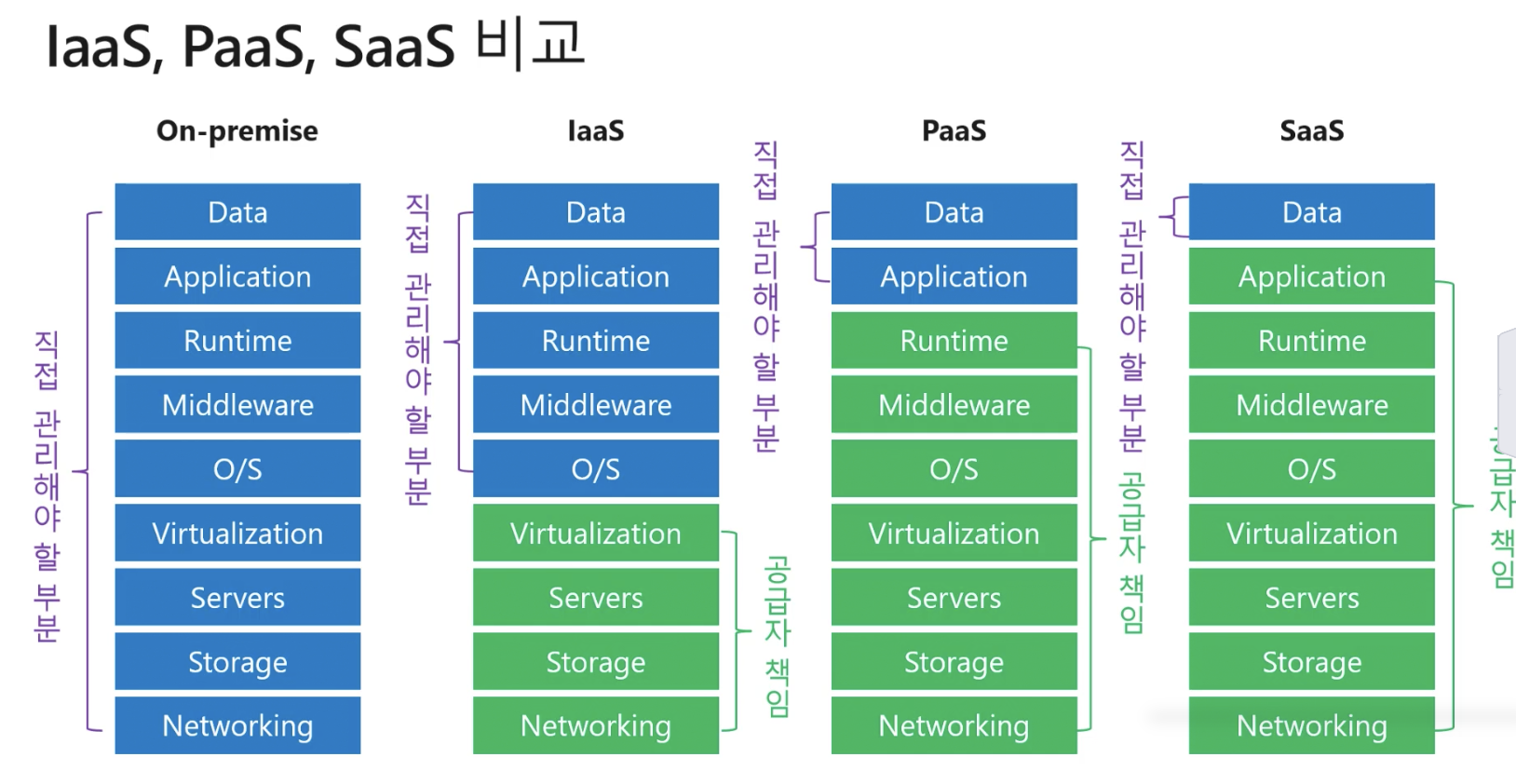
2. Iaas / Paas / Sass

1) Iaas : Infrastructure as a service

  • 운영체제(os)부터 사용자가 모두 관리(가장 유연)
  • 관리에 따른 리소스가 많이 사용됨

2) Paas : Platform as a Service

  • 클라우드 제공자가 플랫폼을 제공
  • 사용자는 운영체제, 플랫폼 관리 및 업데이트를 신경쓰지 않고 제품에만 집중
  • 다만 유연성이 떨어짐

3) Saas : Software as a Service

  • 클라우드 제공자가 응용 프로그램을 제공(ms365)

3. Cloud 모델 이해하기

  • 공용 클라우드 : AWS / Azure
  • 사설 클라우드 : 사내 인트라넷
  • 하이브리드 클라우드 :

NaverNews_Crawler

Naver News Cralwer

from bs4 import BeautifulSoup
from datetime import datetime, timedelta, date
import requests
import pandas as pd
import re
import os
from math import *

def crawler(query,sort,s_date,e_date):
    query = query.replace(' ', '+')
    s_from = s_date.replace(".","")
    e_to = e_date.replace(".","")

    # find max page number
    # 1. url setting
    basic_url = "https://search.naver.com/search.naver?where=news"
    url = str(basic_url + '&query=' + query + "&sm=tab_opt&sort="+ str(sort)+
              "&nso=so%3Ar%2Cp%3Afrom" + s_from + "to" + e_to)

    # 2. get url
    response = requests.get(url)
    html = response.text
    soup = BeautifulSoup(html, 'html.parser')

    total_count = soup.find_all(attrs={'class':'title_desc all_my'})[0].get_text()
    total_count = total_count.split('/')[1].replace(',','')
    total_count = int(re.findall('\d+', total_count)[0])

#     maxpage = ceil(total_count/10)
#     maxpage_t =(int(maxpage)-1)*10+1   # 11= 2페이지 21=3페이지 31=4페이지  ...81=9페이지 , 91=10페이지, 101=11페이지
#     print('maxPage number : {}'.format(maxpage))

#     page = 1  
#     while page <= maxpage_t:
#         # 1. url setting
#         basic_url = "https://search.naver.com/search.naver?where=news"
#         url = str(basic_url + '&query=' + query + "&sm=tab_opt&sort="+ str(sort)+
#                   "&nso=so%3Ar%2Cp%3Afrom" + s_from + "to" + e_to +
#                   "%2Ca%3A&start=" + str(page))

#         # 2. get url
#         response = requests.get(url)
#         html = response.text

#         #뷰티풀소프의 인자값 지정
#         soup = BeautifulSoup(html, 'html.parser')

#         #<a>태그에서 제목과 링크주소 추출
#         atags = soup.select('._sp_each_title')
#         for atag in atags:
#             title_text.append(atag.text)     #제목
#             link_text.append(atag['href'])   #링크주소

#         #신문사 추출
#         source_lists = soup.select('._sp_each_source')
#         for source_list in source_lists:
#             source_text.append(source_list.text)    #신문사

#         #날짜 추출
#         date_lists = soup.select('.txt_inline')
#         for date_list in date_lists:
#             test=date_list.text   
#             date_cleansing(test)  #날짜 정제 함수사용

#         #본문요약본
#         contents_lists = soup.select('ul.type01 dl')
#         for contents_list in contents_lists:
#             #print('==='*40)
#             #print(contents_list)
#             contents_cleansing(contents_list) #본문요약 정제화


#         #모든 리스트 딕셔너리형태로 저장
#         result= {"date" : date_text ,
#                  "title":title_text ,
#                  "source" : source_text ,
#                  "contents": contents_text ,
#                  "link":link_text,
#                  "query" : query}
# #         print(page)

#         df = pd.DataFrame(result)  #df로 변환
#         page += 10

    return total_count#, df